

The Benefits of Using MYOB for Small Business Financial Management
Discover the key benefits of MYOB for small business financial management. Learn how MYOB can simplify accounting, invoicing, payroll, cash flow, reporting, and everyday financial tasks while helping small businesses save time and manage their finances more efficiently.
Table of Contents
What Is MYOB and How Does It Help Small Businesses?
Running a small business involves much more than selling products or services. Owners need to track income, record expenses, send invoices, monitor payments, manage payroll, prepare tax information, and understand whether the business is actually making money. MYOB is a business and accounting solution that helps manage various financial tasks through a single integrated platform. Its current MYOB Business offering includes tools for invoicing, cash-flow management, bank connections, tax and GST, payroll, reporting, inventory, and other everyday financial tasks.
One of the key benefits is that businesses can keep their financial information organized in one place instead of managing it across notebooks, spreadsheets, emails, and multiple applications. Instead, a business can keep important financial records in a connected digital environment. This approach can simplify bookkeeping while giving business owners a clearer understanding of their overall financial activities. For a small company where the owner may also be the salesperson, manager, administrator, and bookkeeper, reducing repetitive financial work can make a meaningful difference. MYOB also provides cloud-based access through desktop and mobile devices, allowing users to work with business information from different locations.
From Basic Bookkeeping to Business Management
Traditional bookkeeping often focuses on recording what has already happened. Modern accounting software can go further by helping business owners understand current transactions and organize information for future decisions. MYOB’s financial reporting tools are designed to turn accounting information into reports that can help users understand business performance.
Accounting software can be viewed as a central financial dashboard for a business. Rather than checking multiple spreadsheets to review sales, expenses, bank activity, and invoices, business owners can use integrated tools to manage much of this information in one place. While software cannot replace sound financial judgment, it can make important financial data more accessible, organized, and easier to manage.
Key Features of MYOB


- Invoicing and Quotes – Create, customize, and send professional invoices and quotes.
- Expense Tracking – Record and organize business expenses for better financial control.
- Bank Feeds – Connect business bank accounts and import transactions automatically.
- Cash Flow Management – Monitor incoming and outgoing money to understand cash flow.
- GST and Tax Management – Track GST and prepare financial information for tax reporting.
- Payroll Management – Manage employee wages, leave, superannuation, and payroll reporting.
Simplifies Everyday Accounting
One of the main benefits of MYOB for small businesses is the ability to simplify routine accounting work. Small-business owners often have limited time for administrative tasks, and manual bookkeeping can quickly become repetitive. Recording transactions, creating invoices, checking payments, storing receipts, and preparing reports can take hours when each task is handled separately. MYOB provides features that bring several of these activities into a single accounting environment. Its current small-business tools include income and expense tracking, receipt storage, invoicing, bank connections, tax management, and reporting.
This integrated approach can also help businesses keep their financial records more organized and manageable. Instead of waiting until the end of the month to collect receipts and update spreadsheets, a business can record transactions throughout the normal working week. Regular bookkeeping is generally easier to manage than a large backlog of financial work. When records are kept consistently, owners and accountants can spend less time trying to reconstruct what happened several weeks earlier.
Reduce Manual Financial Work
Manual data entry creates another challenge: simple typing or classification mistakes can affect financial records. MYOB includes bank-feed functionality and automated transaction matching features that can reduce some repetitive entry and reconciliation work. MYOB says connected bank transactions can flow directly into MYOB Business rather than requiring users to enter every transaction manually.
Automation does not mean every transaction should be accepted without checking. Business owners still need to review unusual transactions and make sure categories are correct. The benefit is that software can handle more of the repetitive process while the owner focuses attention on exceptions and important financial decisions.
Makes Invoicing Faster and Easier
Receiving payments on time is essential for maintaining a healthy cash flow in a small business. A company can have strong sales and still experience financial pressure if customers take too long to pay. MYOB provides tools for creating and sending professional invoices and quotes, while its invoicing features can also support payment reminders and online payment options.

A well-organized invoicing process creates a clearer path from sale to payment. Businesses can use saved customer information and product or service details rather than rebuilding every invoice from scratch. MYOB also promotes customizable invoice templates, allowing businesses to include branding and payment information.
For a small business, this can make the difference between invoicing immediately after completing a job and postponing the task until the end of the week. Faster invoicing can help businesses maintain a more predictable collection process. MYOB’s smart invoice reminder features can also help businesses follow up on unpaid invoices without relying entirely on memory.
Improves Cash Flow Management
Managing cash flow effectively is a major financial priority for small businesses. Profit and cash are not always the same thing. A business may report sales but still struggle to pay suppliers, employees, rent, or other bills if money has not yet been collected from customers.
MYOB provides tools designed to help businesses monitor income, expenses, invoices, and financial information in one place. Its current MYOB Business features include cash-flow management, budgeting, financial reporting, and income and expense tracking, depending on the plan selected.
Track Income and Expenses More Clearly
When income and expenses are recorded consistently, an owner can identify patterns more easily. For example, a business might discover that sales are increasing but operating costs are also rising quickly. Another business may notice that certain customers regularly pay late. These insights can support practical decisions about pricing, purchasing, payment terms, or spending.
The real benefit is not simply having access to a larger amount of financial data. The value comes from having financial information organized well enough to understand what those numbers mean. MYOB’s reporting tools are intended to make accounting data easier to turn into useful financial information for decision-making.
Connects Business Bank Accounts
Bank reconciliation is a common bookkeeping task, and manual entry can become difficult as transaction volumes increase. MYOB Business supports bank feeds that bring transaction information from connected bank accounts or credit cards into the software. MYOB states that bank feeds are available with all MYOB Business subscriptions, although the number of accounts that can be connected depends on the plan.
This means a business owner does not necessarily have to type every bank transaction into the accounting system. MYOB can receive transactions from the financial institution, after which users can review and match them with existing records. The system also has AI-driven transaction matching and category suggestions being rolled out for bank transactions.
The practical benefit is time. A business with many transactions can spend less time copying information from bank statements and more time checking whether transactions have been categorized correctly. MYOB also says that if a bank or account type does not support a particular connection method, users can import bank or credit-card statements instead.
Supports Tax and GST Management
Tax administration can become stressful when financial records are incomplete or spread across different systems. MYOB provides features for tax and GST management, including GST tracking and BAS-related functions on applicable plans. Its current MYOB Business Lite and Pro offerings include GST tracking and BAS capabilities.
For businesses operating in Australia, this can be especially useful because accounting records need to support local tax and reporting requirements. MYOB also describes automatic tax calculations and reporting to the Australian Taxation Office as part of its accounting capabilities.
However, accounting software should not be treated as a replacement for professional tax advice. Business owners should still check whether transactions have been recorded correctly and whether their business structure or tax circumstances require advice from a qualified professional. The software can organize financial information, but sound financial decisions still require human review.
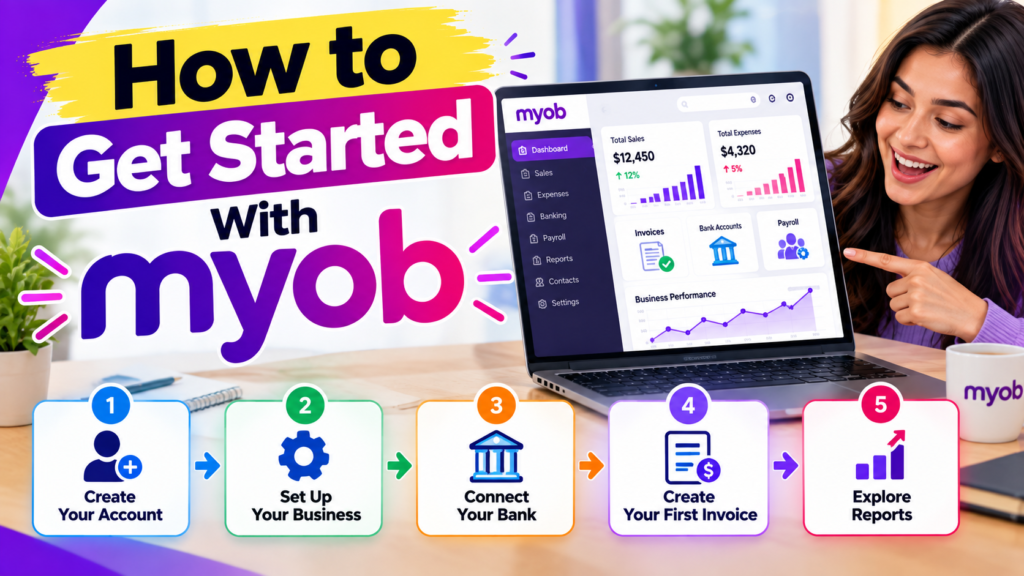
How to Get Started With MYOB
Getting started should begin with understanding the business rather than simply choosing the plan with the most features. First, identify the tasks that currently take the most time. These might include invoicing, bank reconciliation, expense tracking, payroll, inventory, or tax preparation.
Next, compare those requirements with the features offered by the available MYOB plans. A sole trader with no employees may have very different needs from a business with multiple employees and significant inventory. MYOB currently separates its products into different options to address different business sizes and requirements.
After choosing a suitable plan, the business can set up customers, suppliers, financial categories, bank connections, invoices, and other relevant information. MYOB provides support resources for setting up users, invoices, bank accounts, customers, suppliers, and payroll.
Choosing the Right Plan
A useful approach is to avoid paying for features that will not be used. At the same time, choosing a plan that is too limited can create extra work later. Consider the following questions before subscribing:
- How many employees need payroll?
- How many bank accounts need to be connected?
- Does the business sell physical inventory?
- Is GST/BAS management required?
- How detailed do financial reports need to be?
- Will an accountant or bookkeeper need access?
- Does the business need advanced reporting or analytics?
- Is mobile access important?
These questions can help turn software selection into a practical business decision rather than simply comparing subscription prices.
Makes Payroll Management Easier
Payroll is another area where small-business owners can spend significant administrative time. Calculating wages, leave, tax-related amounts, superannuation, and reporting requirements can become complicated as the number of employees increases. MYOB provides payroll functionality with different levels of support depending on the plan. Its current Pro plan, for example, supports payroll for multiple employees as an additional feature, while AccountRight Plus includes unlimited payroll without an additional payroll usage charge according to MYOB’s current pricing page.
MYOB also states that its payroll tools can calculate superannuation, PAYG, and leave entitlements and support Single Touch Payroll reporting. Employee self-service features can allow workers to access payslips, submit leave, and handle parts of their own employee information through MYOB Team.
For a small business, bringing payroll closer to accounting information can reduce duplication. Instead of maintaining separate spreadsheets for employee payments and financial records, payroll information can be managed within the wider accounting environment. This can make monthly financial review easier and give owners a clearer picture of labour costs.
Helps Manage Inventory and Orders
For businesses that sell physical products, inventory management can become difficult as product numbers increase. Owners need to know what has been purchased, what has been sold, and what remains available. MYOB Business includes inventory and order management features on applicable plans, while higher-level MYOB solutions provide more advanced inventory capabilities.
Connecting product information with accounting can help reduce the need for separate records. When financial and operational information are better connected, owners can get a broader picture of how purchasing and sales affect the business. This can be useful for retailers, wholesalers, trades businesses, and other companies where stock represents a significant part of business operations.
Inventory management also connects directly to cash flow. Money tied up in slow-moving stock cannot be used for other business needs. Better visibility can help owners identify products that sell quickly and those that may need a different purchasing or sales strategy.
Also Read
Building a Fast and User-Friendly WordPress Site with MH Themes
Understanding the Features and Benefits of Manfrotto Products
The Ultimate Guide to Choosing Ships in World Of Warships
Why Tech Enthusiasts Are Exploring Deals on GeekBuying
Everything You Need to Know About Miro for Online Collaboration
Helps Small Businesses Save Time
Time is one of the most valuable resources for a small-business owner. Every hour spent entering transactions or preparing repetitive paperwork is an hour that cannot be spent on customers, sales, product development, or business planning. MYOB is designed to reduce manual work through features such as bank feeds, automated matching, invoicing tools, receipt capture, payroll automation, and reporting.
The exact time savings will vary from one business to another. A business with only a few monthly transactions may not experience the same benefit as a growing company with hundreds of transactions, employees, invoices, and bank movements. Still, automation can become increasingly valuable as transaction volume grows.
Automation and AI Features
MYOB is also adding AI-supported capabilities to its current products. Its current product pages identify built-in AI features, while its banking tools include AI-driven transaction matching and category suggestions. MYOB also offers AI BAS as an additional product for eligible Australian businesses under specific conditions.
These features should be viewed as support tools rather than automatic substitutes for financial oversight. AI can help identify patterns or suggest classifications, but users should review important financial information before relying on it for business decisions or compliance.
Offers Scalable Plans for Growing Businesses
A small business may start with straightforward accounting needs and become more complex over time. An owner might begin as a sole trader, hire employees later, introduce inventory, increase transaction volumes, or require more detailed reporting. Accounting software becomes more useful when it can grow with these changing requirements.
MYOB currently offers several options, including Solo, MYOB Business Lite, MYOB Business Pro, and AccountRight plans. The features and pricing differ between products, allowing businesses to choose based on their size and requirements.
This means a business does not necessarily need to purchase the most advanced solution from the beginning. Instead, it can evaluate what it actually needs today and consider how those needs may change as the business develops.
MYOB Pricing and Plan Considerations
Pricing changes over time, so businesses should check the current MYOB pricing page before purchasing. As of September 2026, MYOB’s Australian pricing page lists promotional and standard prices for several plans. For example, the page currently lists MYOB Business Lite at $94.50 per year during the displayed promotional period, compared with $315 per year after the offer, while MYOB Business Pro is listed at $21 per month during its displayed promotion, compared with $70 per month after the offer. AccountRight Plus is listed at $66 per month during its displayed promotion, compared with $165 per month after the offer.
MYOB Option | Current stated use | Example current displayed price* |
Solo | Sole traders needing mobile business management | $12/year first 12 months |
Business Lite | Sole traders and small businesses with up to 2 employees | $94.50/year promotional price |
Business Pro | Small to medium businesses with multiple employees | $21/month promotional price |
AccountRight Plus | Established businesses needing payroll and inventory | $66/month promotional price |
*Prices and promotions are time-sensitive and may change. The figures above reflect MYOB’s current Australian pricing page at the time of research.
Businesses should also look beyond the headline subscription price. Payroll, premium inventory, online payments, additional services, and other optional features may have separate costs depending on the product and usage. MYOB’s product information should therefore be checked before making a purchasing decision.
Is MYOB Suitable for Every Small Business?
MYOB can be useful for many small businesses, but suitability depends on the company’s size, location, accounting requirements, budget, and preferred workflow. The current product range is particularly focused on sole traders and small-to-medium businesses, with different plans covering different combinations of accounting, payroll, inventory, banking, and reporting features.
Businesses outside MYOB’s main supported markets should also check local tax, payroll, banking, and reporting compatibility before selecting the software. For example, many of the tax and BAS features discussed on MYOB’s Australian website are designed around Australian requirements. Businesses should therefore evaluate the version and regional product applicable to their location.
The most important point is that accounting software works best when it fits the way a business actually operates. MYOB can organize financial information and automate repetitive tasks, but the owner remains responsible for reviewing records, understanding performance, and making financial decisions.
Conclusion
MYOB can make small-business financial management more organized, connected, and efficient. Its current tools cover important areas such as invoicing, bank feeds, expense tracking, cash-flow management, tax and GST, payroll, reporting, inventory, and mobile access. The biggest practical benefit is the ability to bring many financial tasks into one system instead of depending on disconnected spreadsheets and manual processes.
For a growing business, that organization can become increasingly valuable. Automated bank transactions, invoice reminders, financial reports, payroll tools, and AI-supported features can reduce repetitive work and help owners spend more time understanding their business. At the same time, software should be selected based on actual needs, because pricing, features, regional requirements, and optional charges can vary.
Frequently Asked Questions
MYOB is used for accounting and business financial management. Depending on the plan, businesses can use it for invoicing, expenses, bank feeds, GST, payroll, inventory, reporting, budgeting, and cash-flow management.
Yes. MYOB Business supports bank feeds that can bring transactions from connected bank accounts or credit cards into the accounting system. The number of accounts supported depends on the plan.
Yes. Payroll is available with relevant MYOB plans, with different limits and pricing depending on the product. MYOB also provides tools for payroll calculations and Single Touch Payroll reporting in its Australian offering.
MYOB offers products specifically aimed at sole traders, including Solo and Business Lite. The appropriate option depends on whether the sole trader needs features such as GST tracking, invoicing, bank connections, receipts, inventory, or payroll.
Yes. MYOB provides financial reporting features designed to help businesses turn accounting data into information about business performance. The level of reporting and analytics available depends on the plan.
Table of Contents
Popular Posts

-
 Affordable Technical SEO Audit for Small Business: A Complete Guide26 Jun 2025 Blog
 -
 How to Get an Affordable Technical SEO Audit for Small Business27 Jun 2025 Blog
 -
 Local SEO Audit Checklist for Startups: A Beginner’s Guide28 Jun 2025 Blog
 -
 The Ultimate Local SEO Audit Checklist for Startups28 Jun 2025 Blog
 -
 Top On-Page SEO Audit Steps for Service Websites Every Business Should Know29 Jun 2025 Blog
 -
 The Impact of On-Page SEO Audit Steps for Service Websites on UX01 Jul 2025 Blog
 -
 Technical SEO for WordPress: The Ultimate Beginner’s Guide01 Jul 2025 Blog
 -
 Technical Mobile SEO Audit Tips for Developers02 Jul 2025 Blog
Related Post